How to Sign Up for MTD for Income Tax: Step by Step
A step-by-step guide to signing up for Making Tax Digital for Income Tax — what you need, how to register with HMRC (or through your software or accountant), and what happens after you join.
The short answer
To sign up for MTD for Income Tax you need a Government Gateway user ID, your National Insurance number, and MTD-compatible software. You (or your accountant) register your self-employment and property income for MTD, connect your software to HMRC, and from then on submit quarterly updates and a final declaration digitally instead of an annual tax return.
Signing up for Making Tax Digital (MTD) for Income Tax is a one-time setup. Once you're in, you file digitally through software rather than doing an annual return. Here's exactly what to do.
Before you start: what you need
- A Government Gateway user ID and password (the same login you use for Self Assessment). If you don't have one, you can create it during sign-up.
- Your National Insurance number.
- Your business details — start date, and whether you have self-employment income, UK property income, or both.
- MTD-compatible software ready to connect.
Step 1: Confirm you're in scope
Check your gross qualifying income (self-employment plus property, before expenses) against the threshold — over £50,000 for 2026/27. If you're under it, you can still join voluntarily, but you're not required to yet.
Step 2: Choose your software first
Sign-up and filing both run through software, so pick it before you register. Look for something that:
- is listed by HMRC as compatible;
- matches how you keep records (full bookkeeping vs. importing a spreadsheet);
- handles your income types (self-employment, UK and foreign property, CIS).
Step 3: Register for MTD
You can register in one of three ways:
- Directly with HMRC through your Government Gateway account.
- Through your software, if it offers guided sign-up.
- Via your accountant, who registers you as their authorised client.
You'll confirm your income sources and the date you want MTD to start.
Step 4: Connect your software to HMRC
The first time you file, your software sends you to HMRC's own login and consent screen. You sign in and grant access — the software never sees your Government Gateway password. After that, it can pull your obligations and submit updates for you.
Step 5: File your first quarterly update
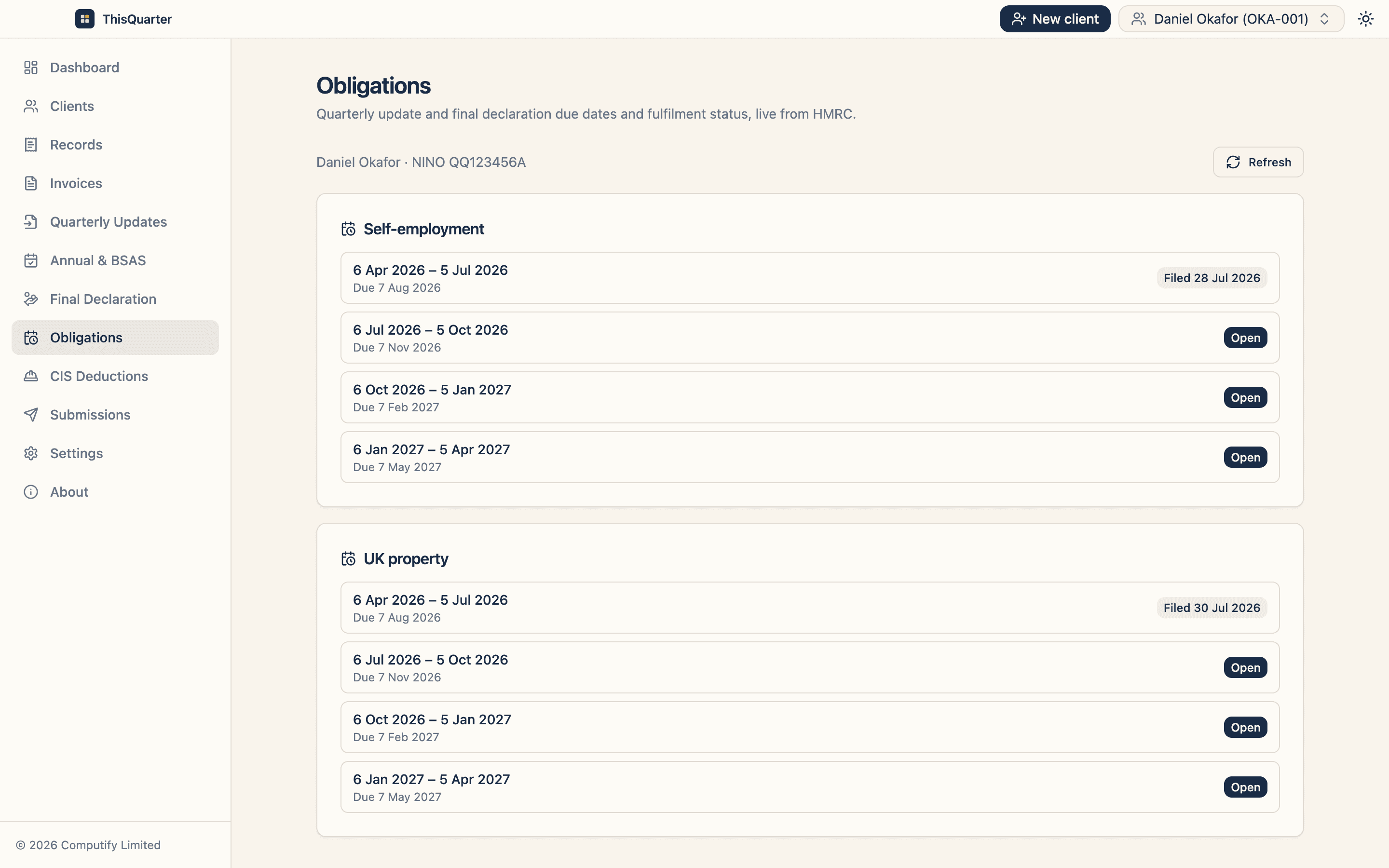
Once connected, your software shows your obligations — the open quarters and their deadlines. Enter or import your figures, review them, and submit.
Tip: sign up and connect before your first quarter closes, so your first deadline (7 August for Q1) isn't a rush.
If you use an accountant
Your accountant will need you to authorise them as your agent through HMRC. Once that's done, they can sign you up and file everything for you — you just supply the figures or records.
Key takeaways
- You need a Government Gateway login, your NI number, and compatible software to sign up.
- Register directly, through software, or via your accountant.
- Connecting to HMRC uses HMRC's own login — your password stays with HMRC.
- Do it early so your first quarterly deadline isn't a scramble.
This article is general information, not tax advice. Check the latest sign-up steps at gov.uk or speak to your accountant.
Frequently asked questions
What do I need to sign up for MTD?
A Government Gateway user ID and password, your National Insurance number, your business start date and type (self-employment and/or property), and MTD-compatible software to connect to HMRC.
Do I have to sign up, or does it happen automatically?
For the first waves you generally need to sign up — either directly with HMRC, through your software, or via your accountant. HMRC also writes to people it believes are in scope. Don't wait for a letter if you know you're over the threshold.
Can my accountant sign me up?
Yes. An accountant acting as your agent can register you for MTD and file on your behalf, once you've authorised them through HMRC's agent authorisation process.
What happens after I sign up?
You connect your software to HMRC, then file a cumulative quarterly update each quarter and a final declaration after year-end. Your old Self Assessment return is replaced for the income within MTD.
Related reading
Best MTD Bridging Software in 2026: What to Look For
A guide to choosing MTD bridging software in 2026 — how bridging works, who it suits, the features that matter, pricing to expect, and how to keep your spreadsheet while still filing digitally to HMRC.
Best MTD Software for Landlords in 2026: What to Look For
How landlords should choose MTD software in 2026 — handling UK and foreign property, joint ownership, finance-cost relief, multiple properties, and filing quarterly updates and the final declaration to HMRC.
MTD for Income Tax Explained for Sole Traders (2026 Guide)
A plain-English guide to Making Tax Digital for Income Tax for sole traders — who's affected, what changes, what you have to do each quarter, and how to get ready before April 2026.