MTD for Income Tax Explained for Sole Traders (2026 Guide)
A plain-English guide to Making Tax Digital for Income Tax for sole traders — who's affected, what changes, what you have to do each quarter, and how to get ready before April 2026.
The short answer
If you're a sole trader with gross self-employment (and/or property) income over £50,000, Making Tax Digital for Income Tax applies to you from 6 April 2026. You'll keep digital records, send HMRC a cumulative quarterly update four times a year through compatible software, and finish the year with a final declaration that replaces your old Self Assessment tax return.
If you run your own business as a sole trader, Making Tax Digital (MTD) for Income Tax is the biggest change to how you file since Self Assessment moved online. This guide explains, in plain English, what it means for you.
What MTD for Income Tax actually is
MTD is HMRC's programme to move tax record-keeping and reporting online. For income tax it means three things:
- Keep digital records of your business income and expenses.
- Send HMRC a quarterly update — a running summary of those figures — four times a year.
- Submit a final declaration after the tax year ends, replacing the old SA100 return.
All of this happens through MTD-compatible software — HMRC has closed its own online return to anyone in MTD scope.
Are you in scope?
It comes down to your gross qualifying income — your total self-employment and property turnover before expenses, based on your 2024/25 tax return.
| From | You're mandated if gross income is |
|---|---|
| 6 April 2026 | over £50,000 |
| 6 April 2027 | over £30,000 |
| 6 April 2028 | over £20,000 |
If you have more than one trade, or a trade and rental income, you add them together to test the threshold.
What you'll do each quarter
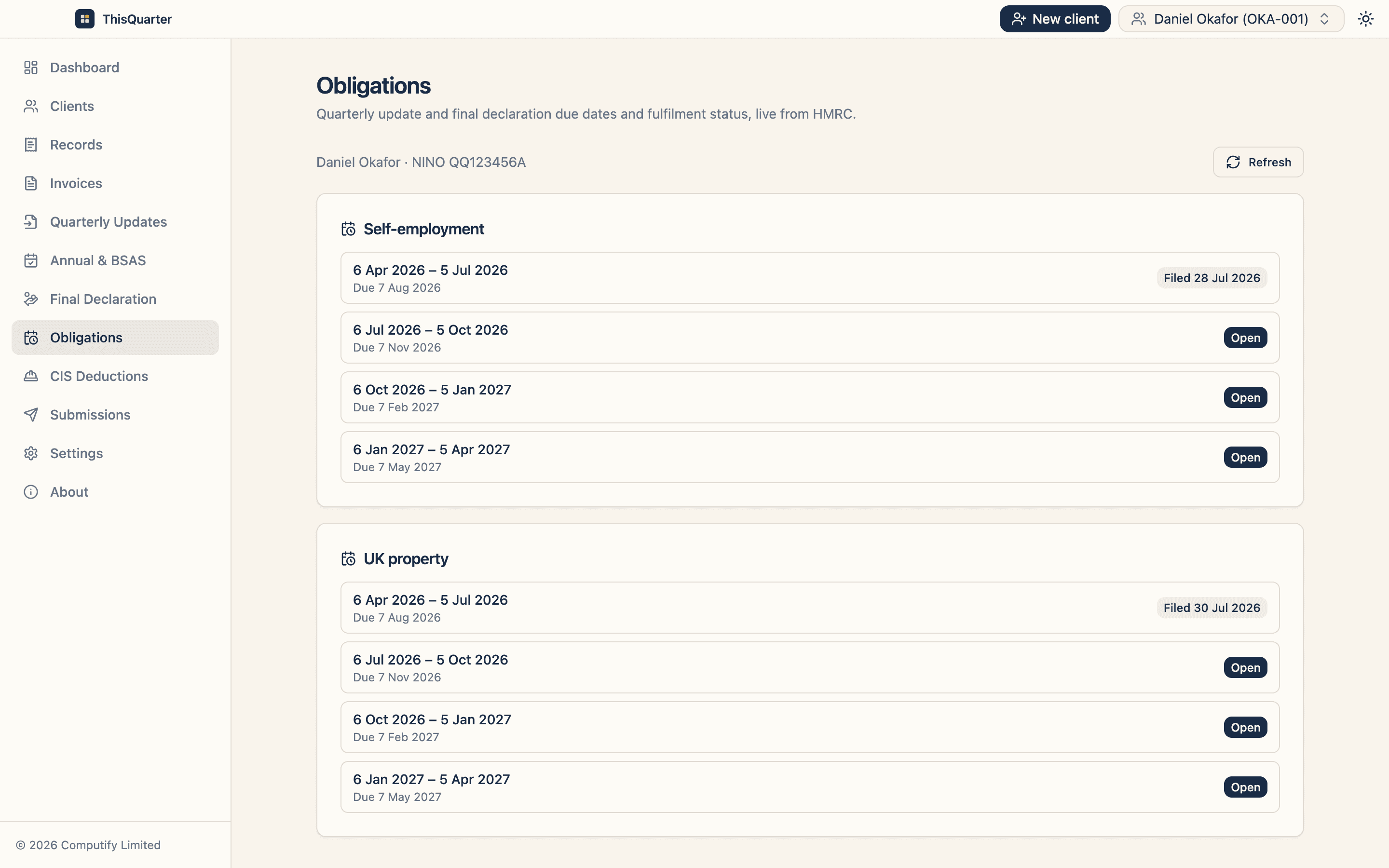
There are four standard quarters, each with a filing deadline about a month after it ends:
| Quarter | Period | Deadline |
|---|---|---|
| Q1 | 6 Apr – 5 Jul | 7 Aug |
| Q2 | 6 Jul – 5 Oct | 7 Nov |
| Q3 | 6 Oct – 5 Jan | 7 Feb |
| Q4 | 6 Jan – 5 Apr | 7 May |
Each update is cumulative — a year-to-date total, not just that quarter's figures. You're not calculating or paying tax each quarter; you're reporting income and expenses so HMRC can build a running picture.
Finalising the year
After 5 April you make any annual adjustments (allowances, adjustments, reliefs), then submit your final declaration. This is where your tax is actually calculated and confirmed. Your payment dates don't change — 31 January (with payments on account) stays the same.
How to get ready
- Check your income against the threshold using your latest tax return.
- Start keeping digital records now so the first quarter isn't a scramble.
- Choose compatible software that fits how you work — see our guide to choosing MTD software.
- If you use an accountant, ask whether they'll file for you or expect you to.
ThisQuarter is a secure desktop app built for exactly this: sole traders, landlords and the accountants who file for them, with quarterly updates, annual adjustments and the final declaration all in one place.
Key takeaways
- MTD is mandatory for sole traders over £50,000 from April 2026, dropping to £30,000 (2027) and £20,000 (2028).
- You'll file four quarterly updates plus a final declaration through compatible software.
- Quarterly figures are cumulative and don't change when you pay.
- Getting your record-keeping digital early is the single best thing you can do.
This article is general information, not tax advice. Check your own position at gov.uk or speak to your accountant.
Frequently asked questions
Does MTD apply to every sole trader?
No. It's mandatory from 6 April 2026 only if your gross qualifying income (self-employment plus property, before expenses) is over £50,000. The threshold drops to £30,000 in April 2027 and £20,000 in April 2028, so most full-time sole traders will be in scope within a couple of years.
Do I still do a Self Assessment tax return?
Not the old SA100. Once you're in MTD you send four quarterly updates and then a final declaration, which is the new way of finalising your tax position. It replaces the annual return for the income sources within MTD.
Can I still use a spreadsheet?
You can keep figures in a spreadsheet, but you must submit to HMRC through MTD-compatible software. Bridging software lets a spreadsheet's totals be filed digitally; full software records the transactions for you.
How much does MTD cost me in time?
If you keep records as you go, each quarterly update is a few minutes — you're summarising income and expenses you've already logged. The extra work comes from doing it four times a year instead of once, which is exactly what good software minimises.
Related reading
Who Is Exempt from Making Tax Digital for Income Tax?
Who doesn't have to follow MTD for Income Tax: income below the threshold, digitally excluded people, and specific groups HMRC has exempted or deferred — plus how to apply for an exemption.
Side Hustle Income: When Do You Have to Declare It?
When a side hustle becomes taxable, the £1,000 trading allowance, when you need to register for Self Assessment, how online-platform reporting works, and when MTD might apply.
MTD for Income Tax Deadlines & Thresholds: 2026, 2027 & 2028
Every Making Tax Digital for Income Tax date and threshold in one place: who joins when, the £50k/£30k/£20k phases, quarterly update deadlines, and the final declaration cut-off.